A/C Refrigerant Filter Installation (C60)
TOOLS REQUIREDJ 39400-A Halogen Leak Detector
IMPORTANT: The A/C Refrigerant filter, AC P/N 15-1696 must be installed to the A/C evaporator tube between the condenser and evaporator. The installation of this A/C refrigerant filter eliminates the need for flushing.
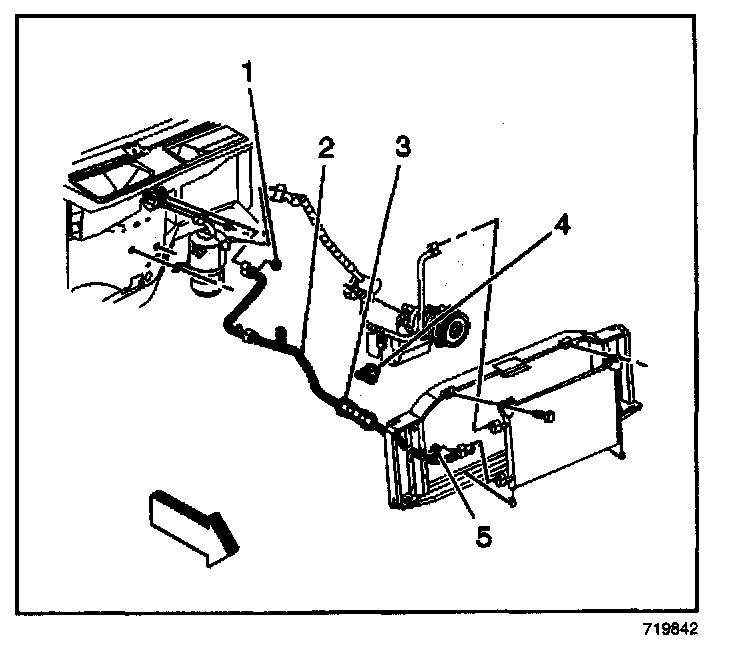
1. Remove the air cleaner. Refer to Air Cleaner Assembly Replacement in Computers and Controls Systems.
2. Measure 50 mm (2 in) from the bend on the evaporator tube (2) near the expansion tube end and mark the location.
3. Measure 50.8 mm (2 in) from the mark on the evaporator tube (2) from the previous step.
IMPORTANT: Do not allow metal burrs to enter the evaporator tube (2) during cutting or when removing the burrs.
4. Using a tubing cutter, cut the marked section of the evaporator tube (2).
5. Remove the burrs from the evaporator tube (2).
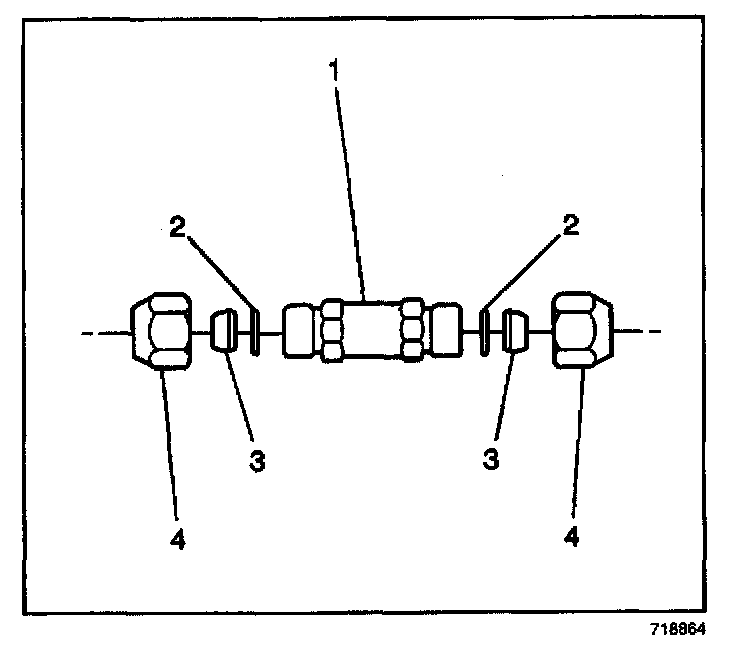
6. Remove the nuts (4), the ferrules (3), and the O-rings (2) from the A/C refrigerant filter (1).
IMPORTANT: DO NOT install the O-rings (2) in this step.
7. Push the nuts (4) and ferrules (3) over each of the evaporator tube halves.
8. Install the ferrules (3) with the small end toward the nut (4).
9. Install the A/C refrigerant filter (3) to the evaporator tube (2) with the flow arrow pointing towards the evaporator.
NOTE: Refer to Fastener Notice in Service Precautions.
10. While holding the evaporator tube in the A/C refrigerant filter (1), tighten the nuts (4) to the A/C refrigerant filter (1).
Tighten
Tighten the nuts to 15 N.m (11 lb ft).
11. Remove the nuts (4) from the A/C refrigerant filter (1).
12. Coat the O-rings (2) with 525 viscosity refrigerant oil.
13. Install the O-rings (2) to the evaporator tube halves.
14. Install the nuts (4) to the A/C refrigerant filter (1).
Tighten
Tighten the nuts to 15 N.m (11 lb ft).
15. Evacuate and recharge the system. Refer to Refrigerant Recovery and Recharging.
16. Leak test the fittings of the component using the J 39400-A.
17. Install the air cleaner. Refer to Air Cleaner Assembly Replacement in Computers and Controls Systems.
"For a description of the RPO Code(s) shown in this article or any of the images therein, refer to the RPO Code List found at Vehicle/Application ID". RPO Codes